
Download Youtube Thumbnail Maker Pro – AI Thumbnail Creator, Free Trial, Fast Design
Overview – Why You Need an AI‑Powered Thumbnail Creator
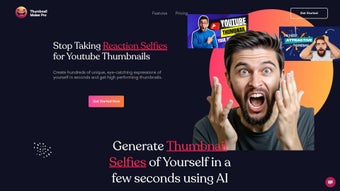
Youtube Thumbnail Maker Pro is an AI‑driven web application built specifically for content creators who want to boost video performance without spending hours in a graphics editor. By harnessing advanced artificial‑intelligence algorithms, the tool instantly generates multiple thumbnail concepts that focus on eye‑catching facial reactions, bold text overlays, and color schemes proven to increase click‑through rates. The platform is subscription‑based, but offers a free trial that lets you test the core features before committing.
Its intuitive drag‑and‑drop interface requires no prior design experience—just upload your background image, select the type of reaction you want to showcase, and let the AI do the heavy lifting. In addition to generating visuals, the software provides on‑the‑fly optimization tips, such as recommended font sizes for mobile screens and suggestions for contrast ratios that meet YouTube’s guidelines. The result is a professional‑grade thumbnail that not only looks great but also aligns with YouTube’s algorithmic preferences, ultimately driving higher viewer engagement and subscriber growth.
For marketers, the speed of creation matters. Traditional design tools can take 15‑30 minutes per thumbnail, whereas Youtube Thumbnail Maker Pro delivers a polished set of options within seconds. This rapid turnaround is especially valuable for channels that publish multiple videos per week and need to keep their visual branding consistent.
Moreover, the platform stores your past designs in a cloud‑based library, making it easy to reuse successful layouts or adapt them for new content. With JavaScript enabled, the service runs smoothly in any modern browser, ensuring a seamless experience whether you’re on a desktop, laptop, or mobile device. The cloud library also includes version control, so you can revert to earlier iterations if a newer design doesn’t perform as expected.
Finally, the tool integrates with YouTube’s API to pull real‑time analytics, allowing you to see which thumbnails are driving the most clicks and adjust your strategy on the fly.
Key Features Powered by AI
- AI Reaction Generator – Choose from a library of pre‑trained facial expressions (surprised, excited, shocked, etc.) that the AI automatically places onto your thumbnail subject.
- Instant Multi‑Option Rendering – The engine produces 5–10 distinct thumbnail variations in under 10 seconds, each with unique composition, text placement, and color palette.
- Smart Text Optimization – Automatic suggestion of font style, size, and contrast based on the underlying image, ensuring readability on all devices.
- One‑Click Export – Export thumbnails directly to PNG or JPEG with the optimal resolution for YouTube (1280 × 720 px) in a single click.
- Cloud Library & Versioning – All generated thumbnails are saved in a personal cloud library, allowing you to revisit, edit, or duplicate past designs.
- Performance Analytics – Integrated A/B testing dashboard shows click‑through rates for each thumbnail variant after publishing.
- Cross‑Platform Accessibility – Works in any modern browser on Windows, macOS, Linux, Android, and iOS without the need for additional software.
- Secure Subscription Management – PCI‑DSS compliant payment processing and encrypted user data storage.
The AI core behind Youtube Thumbnail Maker Pro is built on a convolutional neural network trained on millions of high‑performing YouTube thumbnails. This training enables the system to recognize patterns that attract viewers, such as bright color contrasts, prominent facial emotions, and concise messaging. By automating these design principles, the tool removes guesswork and lets creators focus on content strategy instead of visual design. In addition, the platform continuously learns from the performance data you upload, refining its suggestions over time for your specific niche. This adaptive learning loop means that the more you use the software, the more accurately it predicts which visual elements will resonate with your audience.
Another noteworthy feature is the “Brand Guard” option, which allows you to upload your channel logo and color scheme. The AI respects these branding elements, automatically integrating them into each thumbnail variant while maintaining visual harmony. This ensures that every thumbnail you produce feels cohesive with the rest of your channel’s aesthetic, reinforcing brand recognition across millions of video impressions. For agencies managing multiple channels, the tool also offers a white‑label mode that lets you brand the editor itself, creating a seamless experience for your clients.
Getting Started: Installation and Step‑by‑Step Usage
Because Youtube Thumbnail Maker Pro is a web‑based service, there is no traditional installation process—just a few simple steps to get you up and running:
1. Create an Account & Activate Your Free Trial
Visit the official website and click “Sign Up.” You’ll be prompted to enter an email address and create a password. After confirming your email, you can activate a 7‑day free trial that unlocks all premium features, giving you full access to the AI generator, cloud library, and analytics dashboard. During the trial, you can generate an unlimited number of thumbnails, allowing you to evaluate the impact on your channel’s performance.
2. Enable JavaScript & Choose a Modern Browser
The platform relies heavily on client‑side JavaScript for real‑time rendering. Ensure JavaScript is enabled in your browser settings (Chrome, Firefox, Edge, Safari, or Brave are all supported). No plug‑ins or extensions are required, and the service automatically adjusts to high‑DPI displays for crisp preview quality.
3. Upload Your Base Image
From the dashboard, click “Create New Thumbnail.” Drag‑and‑drop a high‑resolution still from your video or upload a custom background. The system will automatically detect key focal points (faces, objects) to guide the AI placement. If multiple faces are present, you can select which one should receive the reaction overlay.
4. Select Reaction & Text Preferences
Choose a reaction style from the sidebar—options include “Excited,” “Surprised,” “Happy,” and “Serious.” Next, enter your headline text. The AI will propose three font combinations and automatically adjust contrast for readability. You can also set a character limit, and the AI will truncate or re‑phrase the text to fit the visual space.
5. Generate & Refine
Hit “Generate.” Within seconds, you’ll see a grid of thumbnail options. Click any thumbnail to open the editor, where you can fine‑tune the position of the reaction overlay, adjust colors, or replace the suggested text. All changes are saved instantly to your cloud library, and a revision history is maintained for each design.
6. Export & Publish
When you’re satisfied, click “Export.” Choose PNG or JPEG, and the file will download at YouTube’s recommended dimensions (1280 × 720 px) with optimal file size. Upload the thumbnail directly to YouTube via the video manager, or use the built‑in “Publish to YouTube” button to streamline the workflow.
For teams, the platform offers a collaborative workspace where multiple users can comment on drafts and approve final versions before export. This streamlines the workflow for agencies managing several channels, ensuring brand consistency and reducing turnaround time.
Compatibility, Pros & Cons, FAQ & Final Verdict
Youtube Thumbnail Maker Pro runs entirely in the browser, making it compatible with Windows 10/11, macOS Ventura and later, Linux distributions (Ubuntu, Fedora, etc.), as well as mobile operating systems such as Android 13 and iOS 17. All you need is an up‑to‑date browser with JavaScript enabled, which means the tool works on desktops, laptops, tablets, and even smartphones. Because the processing occurs client‑side, there is minimal latency, and the cloud library ensures that your designs are accessible from any device after you log in.
Pros
- Lightning‑fast AI generation saves hours of design work.
- Reaction‑focused thumbnails are proven to increase click‑through rates.
- No steep learning curve; beginner‑friendly UI.
- Cross‑platform accessibility – works on any modern browser.
- Integrated analytics help you track performance of each thumbnail.
- Secure subscription handling and GDPR‑compliant data storage.
- Cloud library with version control protects your assets.
- Brand Guard maintains visual consistency across all designs.
Cons
- Requires a stable internet connection; offline editing is not supported.
- Subscription model may be a barrier for hobbyists on a tight budget.
- Advanced customization (e.g., custom vector shapes) is limited compared to full‑featured desktop editors.
- Free trial is limited to 7 days, after which you must commit to a paid plan.
- Heavy reliance on AI suggestions may reduce creative control for power users.
Review Summary: Youtube Thumbnail Maker Pro delivers on its promise of rapid, AI‑enhanced thumbnail creation. While the subscription cost may deter some, the time saved and the measurable boost in viewer engagement make it a worthwhile investment for serious creators.
Frequently Asked Questions
Is there a free version of Youtube Thumbnail Maker Pro?
The platform offers a 7‑day free trial that provides full access to every feature. After the trial, you need to subscribe to continue using the AI generator and cloud library.
Can I use my own fonts and logos?
Yes. While the AI suggests optimal fonts, you can upload custom fonts and your channel logo. The “Brand Guard” feature ensures these assets are integrated consistently across all generated thumbnails.
Do I need any special hardware to run the AI?
No special hardware is required. All processing is performed in the browser using JavaScript and WebGL, so any device that can run a modern browser will work.
How does the analytics dashboard help improve my thumbnails?
After you publish a video, the tool can pull YouTube’s public metrics (click‑through rate, average view duration) for each thumbnail variant. This data lets you see which design performed best, informing future AI suggestions.
Is my data safe and private?
Yes. All user data, including uploaded images and analytics, are stored on encrypted servers compliant with GDPR and PCI‑DSS standards. The platform does not sell your data to third parties.
Conclusion – Should You Download Youtube Thumbnail Maker Pro?
For creators who publish regularly and need a reliable, fast way to produce eye‑catching thumbnails, Youtube Thumbnail Maker Pro is a game‑changer. Its AI‑driven reaction generator, instant multi‑option rendering, and built‑in performance analytics create a feedback loop that continuously improves your visual strategy. While the subscription model adds a recurring cost, the time saved—often several hours per week—and the measurable uplift in click‑through rates quickly offset the expense.
Because the tool works on any device with a modern browser, you can design from a desktop workstation or on the go from a tablet. The secure cloud library ensures that your designs are always backed up and accessible wherever you are. If you’re serious about growing your channel and want a professional‑grade thumbnail solution without learning complex design software, hitting the “Download” (i.e., start the free trial) button today is the logical next step.
Start your free trial of Youtube Thumbnail Maker Pro now and see how AI can transform your thumbnail workflow.






